Frontapp
Languages:
English
Localization:
World

What is Front used for?
Front is a customer communication and customer operations platform built around a shared inbox. It centralizes messages from key channels into one workspace where conversations are owned, tracked, and handled collaboratively. Instead of emails and requests living in personal accounts, Front makes responsibility explicit with assignments, shared visibility, and structured workflows. This is especially useful for teams that need to move fast without losing context—support, success, sales ops, logistics, or any “inbox-driven” function. The result is fewer dropped threads, clearer accountability, and a cleaner way to scale response quality as the team grows. Front also focuses on operational control: routing rules, reusable replies, analytics, and integrations that connect conversations to CRM and internal systems.
What are Front’s key features?
-
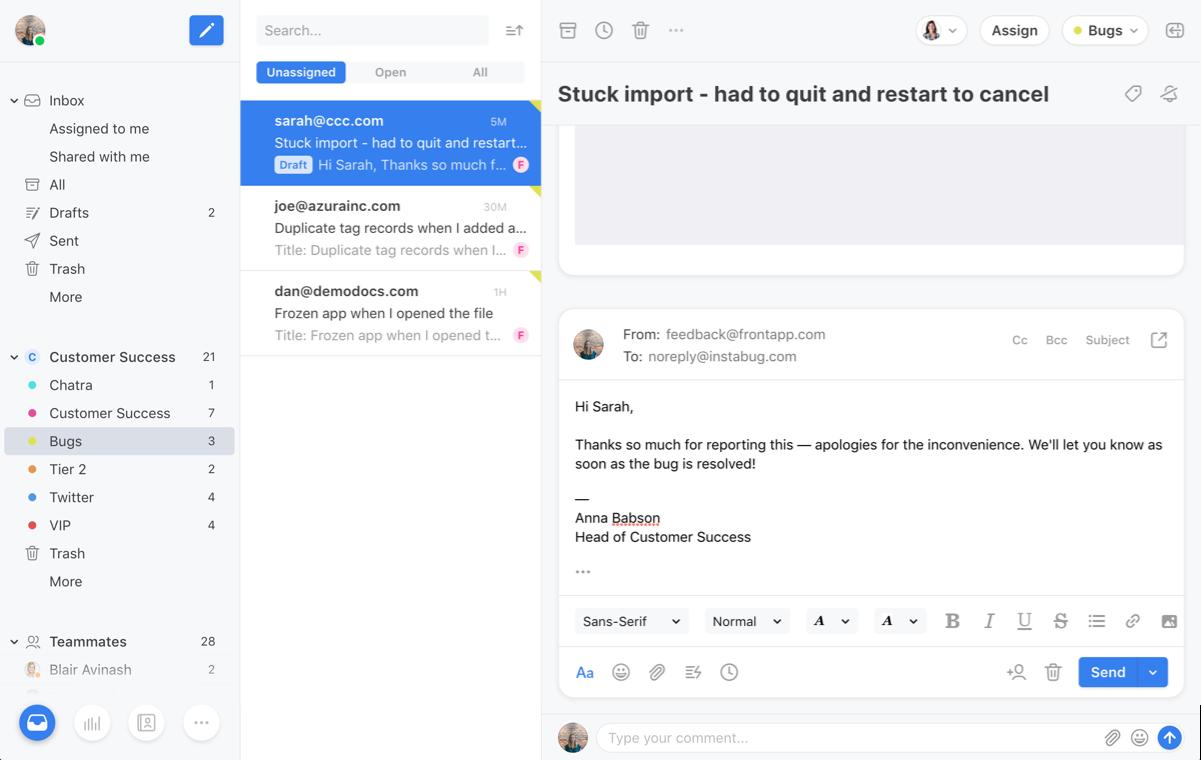
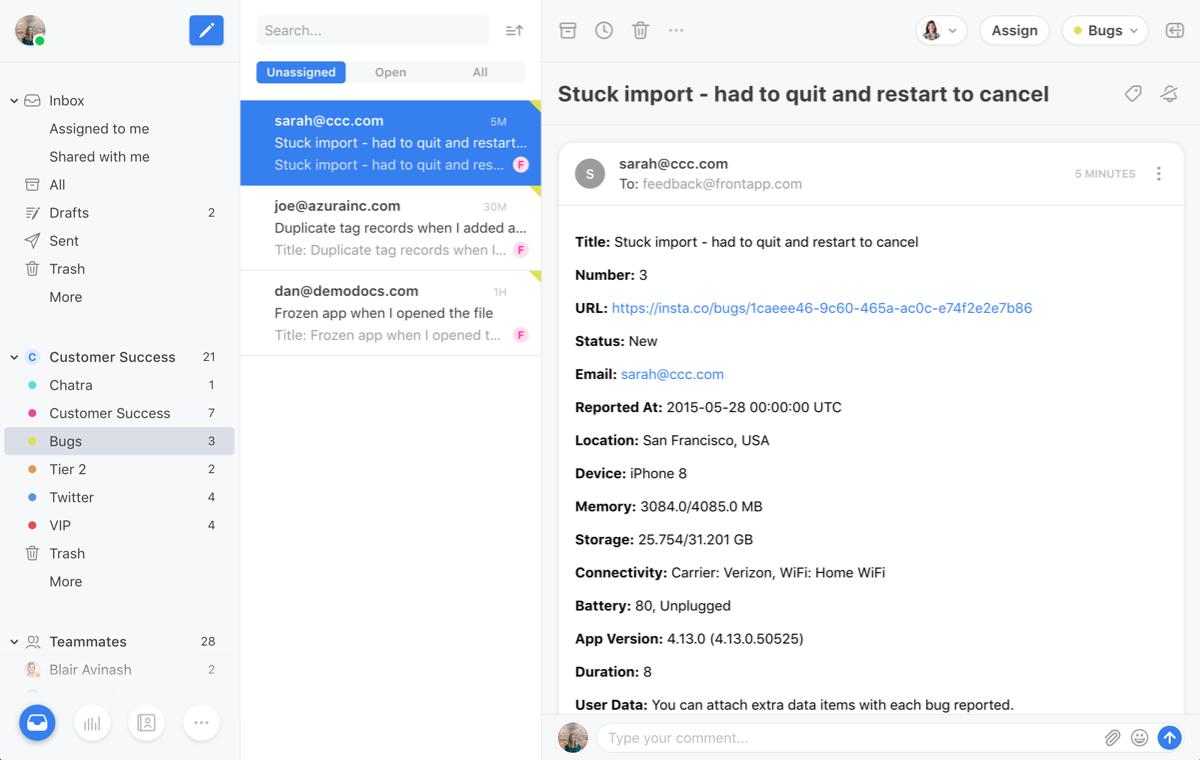
Shared inbox with ownership: Centralize incoming conversations and assign each thread to a specific teammate so work doesn’t disappear in personal mailboxes.
-
Internal comments and collaboration: Discuss a customer thread privately, add context, and coordinate next steps without forwarding chains or leaking internal notes.
-
Shared drafts and approvals: Prepare responses together, review sensitive replies, and maintain consistency for high-stakes customers or regulated workflows.
-
Tags, custom fields, and categorization: Classify conversations (billing, bug, refund, onboarding) to power routing, reporting, and repeatable playbooks.
-
Views and queues: Build live work queues like “VIP waiting,” “unassigned,” “needs follow-up,” or “SLA at risk,” so teams see priorities instantly.
-
Routing rules and workflow automation: Auto-assign based on criteria such as topic, customer tier, language, keywords, or business hours to reduce manual triage.
-
Templates and saved replies: Standardize responses, reduce typing, and keep tone consistent while still personalizing the message.
-
CRM and tool integrations: Sync customer context and log conversations, so communication and customer data stay connected instead of duplicated.
-
Analytics and performance tracking: Measure response times, volume by category, workload distribution, and operational bottlenecks.
What are the best use cases for Front?
-
Customer support at scale: Handle high-volume requests with clear ownership, triage rules, and shared visibility to reduce missed messages and duplicate replies.
-
Customer success and account management: Keep relationship communication organized across stakeholders, with internal notes and follow-ups that don’t rely on one person.
-
Sales ops and lead response: Route inbound questions quickly, collaborate on complex replies, and maintain a fast first-response cadence without chaos.
-
Logistics, dispatch, and order coordination: Manage time-sensitive threads where multiple people need context and the same conversation touches multiple tools.
-
Finance and billing teams: Standardize sensitive workflows (invoices, refunds, disputes) with shared drafts, approvals, and audit-friendly collaboration.
-
B2B teams with named accounts: Build views by customer, tier, or region and coordinate across teams without fragmenting the customer experience.
What benefits does Front deliver?
Front improves operational reliability in communication-heavy work. It reduces “inbox roulette” by turning conversations into trackable work items with owners, status, and structure. Teams get faster response times through routing and templates, higher quality through collaboration and shared drafts, and better prioritization through views and queues. Leaders gain visibility into workload, recurring categories, and process gaps through reporting. The biggest win is scalability: the same team can handle more conversations with less stress, and new hires ramp faster because workflows live in the system instead of tribal knowledge.
What is the user experience like in Front?
Front feels like an inbox that grew up into an operations workspace. Day-to-day usage is straightforward: triage, assign, respond, and collaborate without switching tools constantly. The product works best when set up deliberately—tags, routing, and views turn it from “shared email” into a real system. Teams that invest a bit of time in workflow design typically see the largest payoff. For agents, the experience is about speed and clarity; for managers, it’s about visibility and control; for customers, it’s about getting consistent answers from a team that looks coordinated rather than scattered.
2026-10-07 12:24:07: Meet Front Copilot Youtube
2026-10-07 12:18:11: Smart CSAT Overview Youtube
2026-10-07 12:14:47: Smart QA Overview Youtube
2026-10-07 12:11:43: Front Compass: Measure the impact of your AI agents Youtube
2026-10-07 12:08:47: Front Autopilot Overview Youtube
2026-10-06 23:07:53: Front Product Demo: Unified workspace where teams and AI agents resolve customer requests together. Youtube
2026-10-06 14:00:17: Front: la plateforme ouverte pour les équipes clients et les agents Youtube
2026-09-29 07:00:01: Train AI to review code like your CTO | Buğra Gündüz, HockeyStack Youtube
2026-09-09 07:00:26: The calls voice AI handles better than humans | Nikola Mrkšić, PolyAI Youtube
2026-08-26 05:08:48: Stop bolting AI onto a broken process | Aarde Cosseboom, Palomarr Youtube
Frontapp Alternatives



Frontapp Reviews & Demos
Frontapp Integrations