Brandfolder
Languages:
English
Localization:
World

What is Brandfolder used for?
Brandfolder is a digital asset management platform designed for companies that need a centralized place to store, organize, manage, share, and measure brand assets. It helps teams control files such as logos, images, videos, product photos, campaign materials, sales documents, presentations, brand guidelines, and creative files.
The service is useful when a company has too many assets spread across cloud folders, email attachments, local computers, agency drives, and messaging apps. Brandfolder turns this scattered content into a structured library where users can quickly find approved, up-to-date materials. Marketing teams, creative departments, sales teams, agencies, retail partners, franchises, and distributed organizations can use it as a single source of truth for brand content.
Brandfolder is especially valuable for businesses where brand consistency matters. It helps reduce outdated file usage, duplicate work, manual asset requests, and confusion around which file version is correct.
What are the key features of Brandfolder?
-
Centralized asset library
Brandfolder gives companies one organized location for digital assets. Teams can store brand files, campaign visuals, product images, videos, documents, and other creative materials in a structured library instead of spreading them across disconnected tools. -
Advanced search and metadata
The platform allows users to find assets using keywords, tags, metadata, filters, collections, labels, and asset details. This makes it easier to locate the right file quickly, even in large libraries with thousands of assets. -
Asset sharing and permissions
Brandfolder supports secure sharing with internal teams, external agencies, partners, distributors, retailers, and franchise networks. Permissions help control who can view, download, edit, or access specific assets. -
Brand guidelines management
Companies can use Brandfolder to keep brand instructions, logos, colors, messaging, and approved usage rules in one place. This helps teams and partners follow brand standards more consistently. -
Version control
Brandfolder helps manage updated versions of assets, reducing the risk of people using old logos, expired campaign materials, outdated product photos, or incorrect documents. -
AI-powered organization
The platform includes intelligent features for improving asset discovery and management. These may include automatic tagging, duplicate detection, asset scoring, and content insights that help teams keep libraries cleaner and more useful. -
Asset resizing and transformation
Users can often resize, crop, convert, or adapt approved assets without needing a designer for every small request. This is useful for marketing, social media, sales, and e-commerce teams that need files in different formats. -
Asset analytics
Brandfolder can show how assets are viewed, downloaded, shared, and used. This helps teams understand which content performs well and which files are rarely used. -
Integrations with business tools
Brandfolder can connect with marketing, creative, productivity, content, and workflow tools. This helps companies move approved assets into websites, campaigns, presentations, sales materials, and other systems.
How can businesses use Brandfolder?
-
Marketing campaign management
Marketing teams can organize campaign visuals, videos, ad creatives, landing page assets, social media graphics, and launch materials in one controlled place. This makes campaign execution faster and cleaner. -
Sales enablement
Sales teams can access approved presentations, brochures, case studies, product sheets, and visual materials without asking marketing for files every time. This improves speed and keeps sales content consistent. -
Retail and e-commerce content distribution
Brands can share product images, lifestyle photos, packaging visuals, descriptions, and media kits with retailers, marketplaces, distributors, and online stores. -
Franchise and regional brand control
Companies with many locations or regional teams can give each group access to the correct localized assets while keeping central brand control. -
Agency collaboration
Agencies and external creative partners can receive controlled access to approved files, project assets, campaign materials, and brand instructions without messy folder chains. -
Product launch management
Teams can prepare and distribute all launch-related assets, including visuals, videos, documents, messaging, and partner materials, from one organized location. -
Media and PR asset sharing
PR teams can create controlled media kits with approved images, logos, executive photos, company descriptions, and press materials.
What are the benefits of Brandfolder?
Brandfolder helps companies reduce asset chaos. Instead of wasting time searching for files or asking colleagues for the latest version, teams can access approved materials from one library. This improves productivity and reduces repetitive communication between marketing, design, sales, and external partners.
Another major benefit is brand consistency. When everyone uses the same approved assets and guidelines, the company’s public image becomes cleaner and more controlled. This is important for businesses with many teams, markets, products, or communication channels.
Brandfolder also improves asset governance. Permission controls, version history, rights management, and sharing settings help companies protect valuable brand content. Teams can decide who gets access to what, how files are distributed, and whether assets are still valid for use.
The analytics layer adds another advantage. Companies can see which assets are actually being used and which materials do not bring value. This helps marketing and creative teams make better decisions about future content production.
What is the user experience like in Brandfolder?
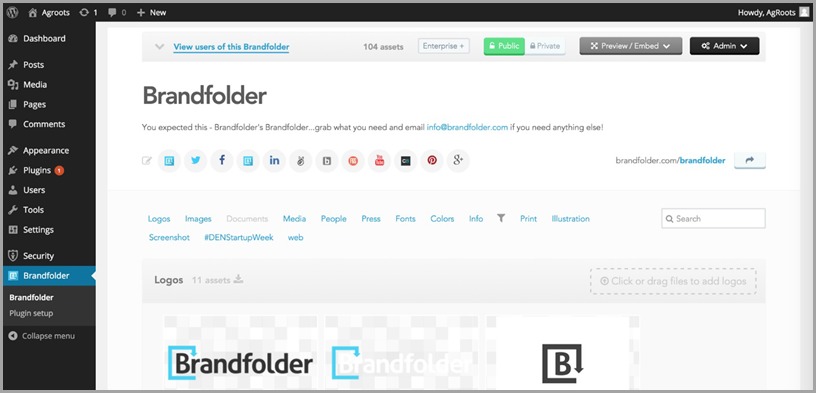
Brandfolder is designed to feel more like a searchable brand portal than a traditional file storage system. Users can browse organized collections, search by keywords, preview assets, download files, share links, and access brand materials without needing deep technical knowledge.
For internal teams, the experience is focused on speed and clarity. A marketer can find campaign assets, a salesperson can download a presentation, and a designer can manage approved creative files from the same environment.
For external users, Brandfolder can work as a controlled self-service portal. Partners, agencies, retailers, or media contacts can access only the assets prepared for them. This reduces manual file requests and keeps communication cleaner.
Overall, Brandfolder is best suited for organizations that treat brand content as an operational asset. It is not just a place to store files. It is a system for organizing, distributing, protecting, and measuring the materials that shape how a company appears across markets, channels, and teams.
2025-05-29 18:23:24: Canva + Brandfolder Youtube
2023-03-28 19:01:31: Lying awake at night dreaming of ‘what ifs’? Our latest podcast guest, turned her ‘what if’ into her reality when she walked away from her job as a corporate event planner to start a candle business. Take a listen and get inspired to ignite your passion! 🕯️https://t.co/DgfuI54CIp https://t.co/eGCTii70ANTwitter
2023-03-21 21:53:54: This year, marketers and creatives are expected to “rough it” by doing more with less. We worked up a wilderness guide to help your team stop surviving and start thriving. 🌱🌷🌲Tell us, are you feeling the pinch this year? https://t.co/3WSPlVCvCF
#marketing #creative https://t.co/V6YyMStdy1Twitter
2023-03-21 00:20:10: Get your creative juices 🥤 flowing with us at #AdobeSummit! Come see us at booth 1141 for FRESH juice, FREE swag and a chance to WIN an Away Carry-on. https://t.co/70Gu31Op2TTwitter
2023-03-17 22:13:51: Feature Spotlight | Brandguide Youtube
2023-03-07 21:20:59: Feature Spotlight | Sharing Assets Youtube
2023-02-24 23:17:54: Brand Collective | TIME x Maya Draisin: Queen Elizabeth, Web3 and the New World of Publishing Youtube
2023-02-23 20:01:14: 🦆 Still struggling to get your ducks in a row when working with sales teams and external agencies? Stop herding cats and start maximizing the impact of your #marketing campaigns by improving collaboration https://t.co/nIMhh2k4Is #marketing #collaboration #sales #agencies https://t.co/Yoo0z1wynsTwitter
2023-02-20 18:01:28: We surveyed 3️⃣0️⃣0️⃣ creative pros about growing demands, how they spend their time and the value the content they generate adds to their brands. Our new #infographic showcases the surprising results of our latest #survey: https://t.co/e9EM10YbVO #branding #creativity https://t.co/JB4l0Np7yfTwitter
2023-02-09 19:01:28: Knock knock…who’s there? 🚪It’s better marketing collaboration with internal and external stakeholders 😲 And our latest infographic has the keys you need to open the door https://t.co/Zthc8NetE4 #marketing #collaboration #infographic https://t.co/szqpS2NY6HTwitter
2023-01-31 16:40:15: True or false: your brand NEEDS to be on #TikTok? 🤔 Answer: FALSE 😲 Tune in to this pod episode to hear why as we debunk this and other #B2Cmarketing myths with the help of Principal & Founder of Striped Elephant, Folayo Lasaki.
https://t.co/U2Pu0nLZXM #disrupt #B2C #podcast https://t.co/Ng9Leds24bTwitter
2022-12-20 19:25:46: Google Chrome Extension | Brandfolder Youtube
2022-12-09 16:01:42: Some Say We’re The GOAT | Happy Holidays from Brandfolder 2022 Youtube
2022-12-01 23:28:53: Content Automation Youtube
2022-10-20 18:57:39: Zeal Optics Client Story | Brandfolder Youtube
2022-10-06 21:21:42: Salsify + Brandfolder Integration Youtube
2022-09-01 21:37:48: Introducing Outfit | Brandfolder by Smartsheet Youtube
Brandfolder Alternatives




Brandfolder Integrations